kintone 用プラグイン · PC / モバイル対応
テーブル行数の調整
テーブルの行数を整えて保存する
「テーブル行数の調整」は、レコード追加画面で指定した行数まで行を補い、保存時に空行を削除するプラグインです。帳票用に最低 5 行を残す設定や、行数が上限を超えた場合に保存を中断する設定もできます。条件に合うときは、行の追加ボタンと削除ボタンを非表示にできます。
ダウンロードテーブルごとに設定できます
- プラグインをインストールし、対象アプリに追加してください。
- 対象のテーブルと初期行数を選択してください。初期行数は 1〜50 行です。
- 「保存時に空行を削除する」「保存時も初期行数を保つ」「初期値だけの行も空行とみなす」を選択してください。上限は 0 で無効、初期行数以上 1000 以下の整数で有効です。
- 必要に応じて、行の追加ボタンと削除ボタンを非表示にする条件を選択してください。
- 設定を保存し、「アプリを更新」を実行してください。
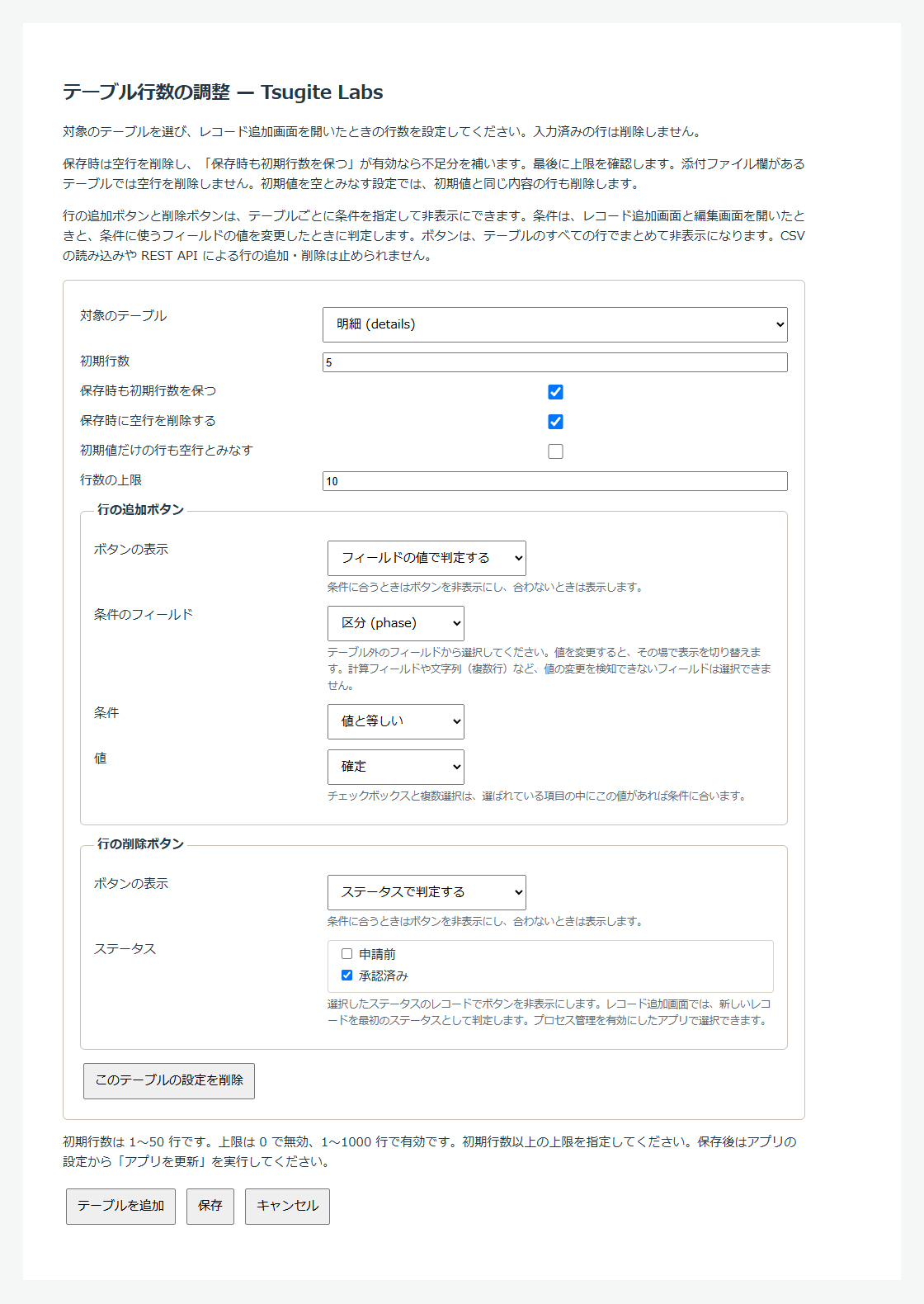
空行を削除してから必要な行数を補います
保存時は空行を削除し、「保存時も初期行数を保つ」が有効なら不足分を補います。最後に上限を確認します。「保存時に空行を削除する」と「保存時も初期行数を保つ」の両方を有効にし、初期行数が 5 行で入力済みが 2 行なら、その 2 行を残し、空の行を 3 行補います。「保存時に空行を削除する」だけを有効にすると、空行を除いた行数で保存します。
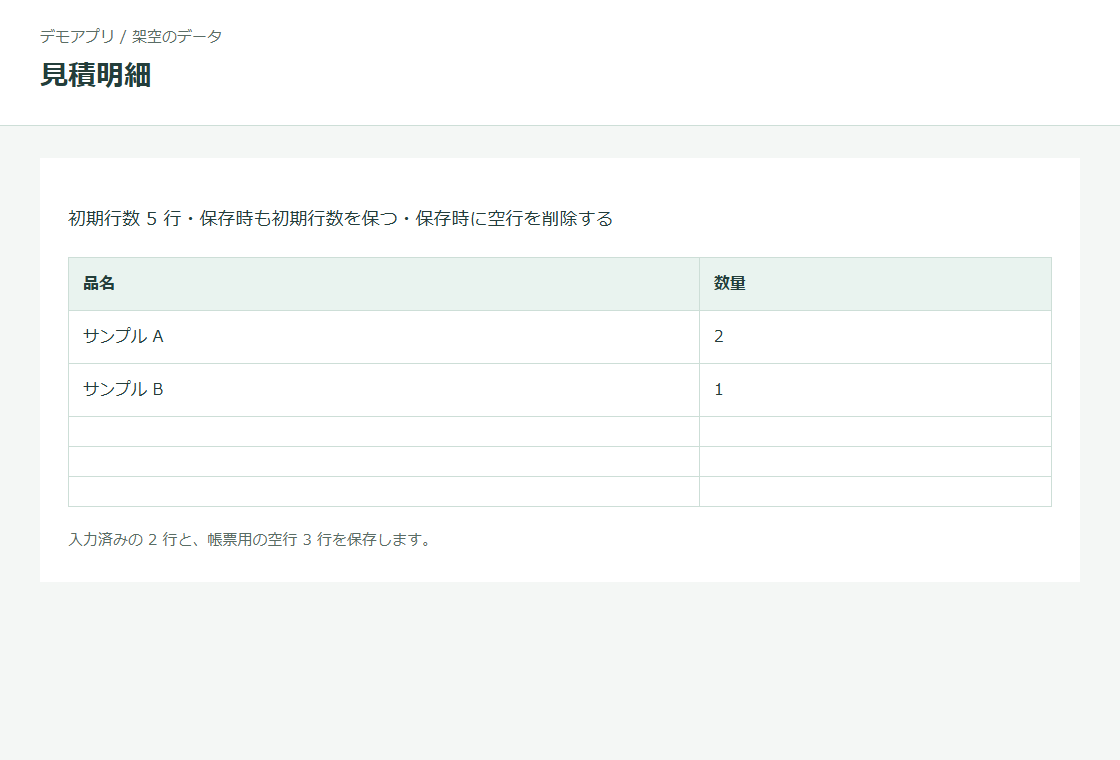
条件に合うときは行の追加・削除ボタンを非表示にします
テーブルごとに、行の追加ボタンと削除ボタンを非表示にする条件を設定できます。たとえば「区分」が「確定」のときは追加ボタンを非表示にする、特定の組織に所属していないユーザーには削除ボタンを表示しない、といった使い方ができます。条件は、レコード追加画面と編集画面を開いたときと、条件に使うフィールドの値を変更したときに判定します。kintone が 2026 年 10 月に追加した JavaScript API を使い、PC とモバイルの両方で動作します。
- ボタンの表示は「常に表示する」「常に非表示にする」「フィールドの値で判定する」「ログインユーザーで判定する」「ステータスで判定する」から選びます。追加ボタンと削除ボタンには、それぞれ別の条件を指定できます。
- フィールドの値の条件は、テーブル外のフィールドの値が「値と等しい」「値と等しくない」「空である」「空でない」「数値が 0 以外」のいずれかに合うかで判定します。値を変更すると、その場で表示を切り替えます。計算フィールドや文字列(複数行)など、値の変更を検知できないフィールドは条件に使えません。
- ログインユーザーの条件には、ログイン名・組織コード・グループコードを指定します。組織は、ユーザーが直接所属する組織だけで判定します。
- ステータスの条件では、選択したステータスのレコードでボタンを非表示にします。レコード追加画面では、新しいレコードを最初のステータスとして判定します。
導入前にご確認ください
- PC とモバイルのレコード追加・編集画面に対応します。詳細画面、一覧のインライン編集、CSV、REST API では動作しません。
- 初期行数の補充は不足分だけです。入力済みの行は切り詰めません。編集画面を開くだけでは補充しません。
- 数値の 0、空白文字、リッチエディターの HTML は入力として保持します。初期値を空とみなす設定では、手入力でも初期値と同じ内容なら削除します。
- 計算結果は空行判定から除きます。現在の日時・ログインユーザーなど、画面を開いたときに決まる初期値やルックアップに入力がある行と、取得できない欄がある行は保持します。添付ファイル欄があるテーブルでは、ファイルの有無にかかわらず空行を削除しません。初期行数の補充と行数の上限チェックは行います。
- 補充する行は設定時の初期値を使います。現在日時とログインユーザーに対応しますが、選択の欄で画面を開いたときに決まる初期値は、ログインユーザーだけに対応します。フィールドや初期値を変えたら設定を保存し直してください。
- 添付ファイル欄がなく、すべて空の場合、「保存時も初期行数を保つ」が無効なら 0 行で保存します。kintone が次の編集時に入力用の行を表示する場合があります。
- 行の削除確認には対応していません。kintone の仕組み上、行を削除する前に止める方法がないためです。
- ボタンは、テーブルのすべての行でまとめて非表示になります。特定の行だけボタンを非表示にすることはできません。CSV の読み込みや REST API による行の追加・削除は止められません。画面から保存するときは、ボタンの表示に関係なく行数の上限を確認します。テーブルが 1 行のときは、kintone の仕様で削除ボタンが表示されません。
- ボタンを非表示にするには、2026 年 10 月以降の kintone が必要です。この API がない環境では、ボタンの表示を変更せず、ほかの機能だけが動作します。条件に使うフィールドを閲覧する権限がない場合と、組織やグループの所属を取得できない場合は、ボタンを表示します。
- テーブルの編集権限が必要です。必須フィールド、ルックアップや他のカスタマイズとの併用は、テスト用アプリで保存できることを確認してください。
外部サービスへの通信は行いません。設定画面は、同じ kintone 環境からフィールド一覧とプロセス管理の設定を取得します。ボタンの条件に組織かグループを指定した場合に限り、追加・編集画面でも同じ環境からログインユーザーの所属を取得します。
ダウンロード
v0.2.0・22665 bytes。ZIP をダウンロードできます。
ダウンロードTable Row Manager
Fill tables to 1–50 initial rows on the record creation page, remove empty rows on save, and enforce an optional limit of up to 1000 rows. Each table has independent settings. A limit of 0 disables it.
Empty rows are removed before applying “Keep the initial row count when saving” and checking the limit. “Keep the initial row count when saving” takes priority over “Remove empty rows when saving”. Static defaults can be treated as empty, including manually entered matching values. Dynamic defaults and populated lookups are retained. Tables with an Attachment field are excluded from empty-row removal, regardless of whether files are attached. Initial row counts and limits still apply. Calculated fields are ignored when checking whether a row is empty; rich-text HTML counts as data.
New rows use the saved defaults, current date/time and login user. Other dynamic selection functions are not populated. Save settings again after changing fields, and validate required fields, permissions, lookups and other customizations in a test app. The plugin supports desktop and mobile create/edit pages, and leaves details, inline editing, CSV and REST writes unchanged. Deletion confirmation is not included. No data is sent to external services. The settings page retrieves fields and process management settings from the same Kintone environment.
Each table can also hide its add-row and delete-row buttons while a condition is met: always, a field value outside tables, the login user (login names, department codes or group codes), or a process management status. Conditions are checked when the page opens, and field conditions again whenever the field changes. The buttons are hidden for the whole table, not for individual rows, and CSV imports and REST API requests can still add or delete rows. This uses the JavaScript APIs Kintone added in October 2026; without them, the buttons are left unchanged. When a condition lists departments or groups, the record pages load the login user’s memberships from the same Kintone environment.