Kintone plugin · Desktop and mobile
Table Row Manager
Free features includedMore features with the plugin pack
Set the table row count before saving
Table Row Manager fills a new record’s tables to your chosen starting row count and removes empty rows on save. Keep five rows for a printed form, block a save when a table exceeds its limit, or hide row buttons when a condition is met.
Download ZIP Pricing and purchaseConfigure each table separately
- As a Kintone Administrator, import the ZIP through Kintone Administration → Plug-ins → Import. Keep it zipped. Then add Table Row Manager to your app through App Settings → Plug-ins → Add.
- Choose a table and an initial row count from 1 to 50.
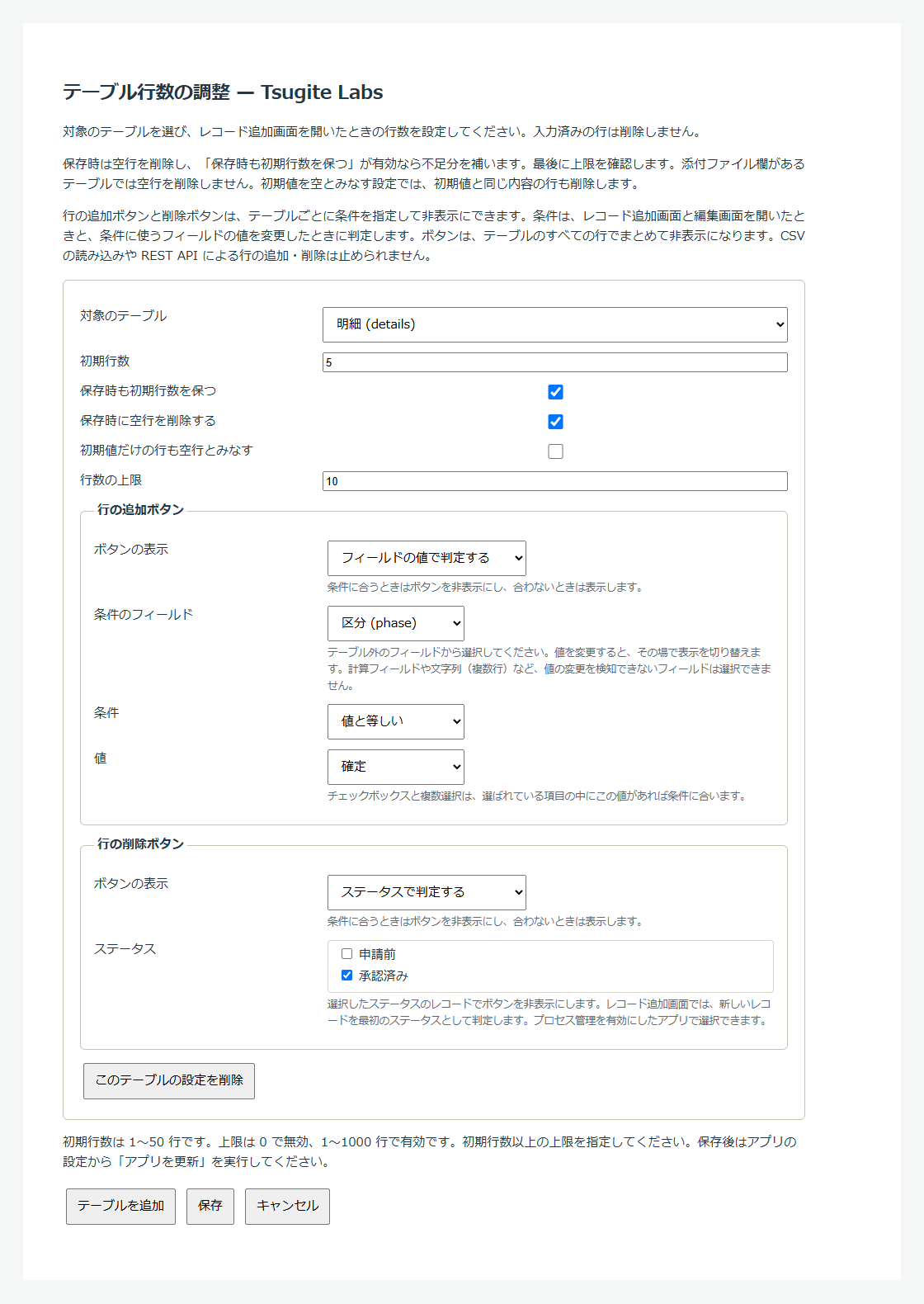
- Choose whether to remove empty rows on save, keep the initial row count on save, and treat rows containing only default values as empty. Set a maximum row count: an integer from the initial count up to 1000, or 0 for no limit.
- If needed, choose when to hide the add-row and delete-row buttons.
- Save the settings, then click “Update App”.
Remove empty rows, then fill to the minimum
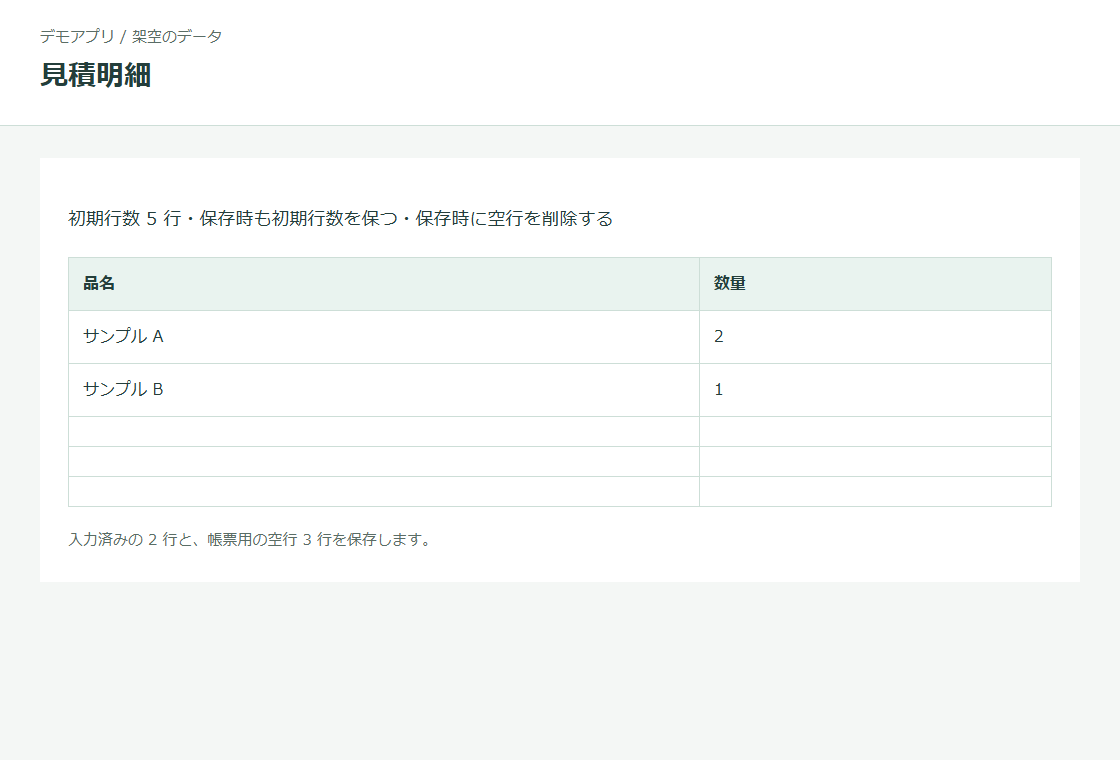
On save, the plugin removes empty rows, fills any missing rows if “Keep the initial row count when saving” is enabled, then checks the maximum. For example, set the initial count to five and enable both empty-row removal and keeping the initial count. Two completed rows will be saved with three empty rows. With only empty-row removal enabled, it saves just the two completed rows.
Hide row buttons when a condition is met
For each table, choose when to hide its add-row and delete-row buttons. For example, hide Add when a category is “Confirmed”, or hide Delete for users outside a department. Conditions run when a create or edit page opens; field conditions also run when the field changes. Button hiding requires Kintone’s October 2026 JavaScript APIs on desktop and mobile; see the compatibility check below.
- Choose always visible, always hidden, field value, login user or process status. Add-row and delete-row buttons can use different conditions.
- Field conditions use a field outside tables: equals, does not equal, is empty, is not empty, or number is not zero. The buttons update when the value changes. Fields without a supported change event, such as calculated fields and multi-line text, cannot be used.
- For user conditions, enter login names, department codes or group codes. Department checks include only direct membership, not parent departments.
- For status conditions, hide the buttons for records in the selected statuses. On a new record, the plugin uses the first process status.
Compare free and pack features
Included in the Tsugite Labs plugin pack: 29,800 JPY per year. Tax included, in JPY. Valid for 365 days. No automatic renewal. Card payment via Stripe on an English checkout page. Your card issuer may add a currency conversion fee. The pack includes paid features in all Tsugite Labs Kintone plugins except Excel Reports. Future plugins are included unless marked as sold separately.
Try paid features free for 30 days. No card required.
The free version and the pack use the same ZIP. Initial rows and empty-row removal are free. To use row limits and hidden buttons after the trial, paste your license key into the settings.
| Free | Plugin pack |
|---|---|
| Fill each table to its initial count, keep that count on save and remove empty rows. No limit on the number of tables. | All free features, plus maximum row counts and hidden add-row/delete-row buttons |
This plugin is not sold separately. Row limits and button hiding are included in the plugin pack at 29,800 JPY per year for one Kintone environment (subdomain).
Your 30-day trial starts when you first save settings that use paid features. No key is needed. After the trial, or after an annual license and its 14-day grace period expire, free features continue working. Row limits and button conditions stay saved but stop applying until you enter a valid key, except for legacy settings described below. The trial is separate for each plugin in each app, not shared across the pack.
You can also buy from the plugin settings. Your license key appears on the payment completion page. Save that page’s URL to find it again.
Upgrading from before version 0.3.0? Limits and button conditions saved in those versions remain active after an update without a key. If you are installing for the first time, you can skip this note.
Check compatibility before installing
- Supports desktop and mobile record create/edit pages. It does not run on detail pages, inline list edits, CSV imports or REST API writes.
- Initial filling adds only missing rows on a new record; it never truncates completed rows. Opening an existing record for editing does not fill rows.
- The number 0, whitespace and rich-text HTML count as data. If you treat default values as empty, rows containing only those defaults are removed even if you entered the matching values manually.
- Rows with only calculated values count as empty. Rows with dynamic defaults such as the current date/time or login user, populated lookups, or unreadable fields are kept. If a table has an Attachment field, empty-row removal is disabled for the entire table even when no files are attached. Initial filling and row limits still apply.
- Added rows use the defaults saved in the plugin settings, including current date/time and login user. For selection fields with dynamic defaults, only login user is supported. Save the settings again after changing fields or defaults.
- If every row is empty, the table has no Attachment field and keeping the initial count is disabled, the plugin saves zero rows. Kintone may show an input row the next time you edit the record.
- There is no confirmation before deleting a row. Kintone does not provide a way for this plugin to intercept deletion.
- Buttons are hidden for the whole table, not individual rows. CSV imports and REST API writes can still add or delete rows. Row limits are checked when saving in supported record pages regardless of button visibility. Kintone hides Delete when only one row remains.
- If the October 2026 button APIs are unavailable, the add-row and delete-row buttons stay as Kintone displays them; initial rows, empty-row removal and row limits still work. In a test app, set a button to always be hidden, save the settings and update the app, then open a create or edit page on each device you use. If the button remains visible, button hiding is not working in that environment. This alone does not prove the API is missing: unreadable condition fields or failed membership lookups can also leave buttons visible.
- You need permission to edit the table. Test saves with required fields, lookups, permissions and other customizations in a test app before using it in production.
The plugin sends no data outside your Kintone environment. Settings retrieve fields and process settings from that environment. Record pages also retrieve your memberships when department or group conditions are configured.
Download ZIP
v0.3.3 · 43178 bytes. Download the signed ZIP.
Download ZIPLanguages, license and terms
These features work independently of country or region.
Japanese and English use the same ZIP and the same license key. There is no separate English purchase. The plugin’s screens follow each user’s Kintone language setting: Japanese when set to Japanese, English for every other language.
You need a Kintone plan that supports plugins. To import the ZIP, you need Kintone Administrator rights. To add and configure it in an app, you need app administration rights. Import the ZIP through Kintone Administration → Plug-ins → Import. Keep it zipped. Add the plugin to your app, save its settings and click “Update App”. To update, import the newer ZIP through the same screen. Updates are manual.
Your license key appears on a page after payment; it is not sent by email. Save that page’s URL to find your key again. You can also find a saved key in the plugin settings. If you lose both, contact us with the product name and the number on your receipt or invoice; do not buy again. Paste the key into the plugin settings for each app, save and update the app. One key covers one Kintone environment (subdomain), with no limit on apps or users. Renew from the plugin settings when needed. No automatic renewal or automatic charges. Paid features have a 14-day grace period after the annual license expires. There is no grace period after a trial ends. The plugin settings show when the trial has ended. There is no trial-end alert on record pages.
Use a Kintone plan that supports plugins. Check the features and permissions described above in a test app in your environment before production use.
The plugin sends no data outside your Kintone environment.
Terms of use (Japanese) · Privacy policy (Japanese) · Seller information and refund terms (Japanese) · Contact form (Japanese)
Contact Tsugite Labs
The contact form page is in Japanese. You can write your message in English. For a problem report, include the screen, plugin settings, field types, fictional example values and any error message. Do not send customer data or real record contents.
Contact form (Japanese)